Claude finds the news. Fundz finds who to call.
Ask Claude alone for this morning’s prospects and you get headlines, the same ones every competitor gets. Connect Fundz and the same prompt comes back as a list ranked against your ICP: who raised and is already hiring, who lost an executive, the right person at each company with a checked email, and who you already know there.
New recipe: this week’s raises in your territory, straight into a Google Sheet
Fundz inside Claude: this week’s raises in your territory, straight into a Google Sheet
Everyone on your team already gets funding alerts. An alert is one signal, landing in an inbox, with no idea who you sell to. What a rep actually needs is a working list: the companies in their territory that raised this week, with everything else Fundz holds on each one fused in, scored to your ICP, and the person to call, in a sheet the team can sort and assign. Since October 6, 2026, Claude can write straight into Google Sheets (Anthropic’s Google Workspace connectors, in beta). Connect Fundz next to it and one prompt builds the sheet.
Connect Fundz
Add the Fundz connector in Claude, steps below. It is included with Pro and Strategic plans and runs as you, with your targeting.
Turn on Google Sheets
In Claude, open Customize, then Connectors, and connect Google Sheets. On a Claude Team or Enterprise plan, an owner enables it first.
Paste a prompt
Swap in your own territory and industry. Claude asks before it calls each tool the first time; choose Always allow and it stops asking.
You already finish the work in Claude. Now it starts there too.
The research, the qualifying, the first draft. That part already happens in an AI tool. What did not move was the data: you looked signals up somewhere else and pasted them in. Connecting Fundz closes that gap. Claude queries your Fundz account directly, with your targeting, your saved filters and your entitlements, and then writes the email in the same breath.
A real morning with Fundz in Claude, start to finish
Two minutes on a real account: the daily leads, why the top one scored 91, what is moving in their buyers’ world, and the email drafted in Gmail. One conversation, no second tab.
What you can ask
Every example below runs against a tool the connector actually exposes. These are not illustrations.
Copy a prompt for your role
Tested in Claude and ChatGPT against your own targeting and leads. Copy one and paste it in.
“Can’t I just ask an AI for recent funding rounds?”
You can, and it will answer. The film at the top of this page is that test, run live. It is worth being precise about what you get.
An answer everyone else can get is not an edge
Ask any model for last week’s rounds in your region and it returns the same list to you and to every competitor who asks. If everyone gets the same list, the list is not the advantage.
Fundz answers against your targeting, your saved filters and the accounts you already worked. That is not a list. It is your list.
A filing feed is one signal, and only when you look
Pulling from EDGAR works, and plenty of good operators do it. But a filing tells you money moved. It does not tell you a VP Sales started on Monday, that they just acquired a competitor, or that they opened a second office.
And one signal, fetched on its own, is a coincidence. The reason to call is the stack.
Any one of those is a reason to call. All three inside ten days is a company that is actually buying. One signal is a guess. Stacked signals, matched to who you sell to and delivered with the person to call, are a reason.
Claude on its own vs. Claude with Fundz
Claude is a great analyst. Fundz gives it the data. Keep the connectors and the report you already built, and add Fundz as one more source.
Connect it in about two minutes, no technical setup
You need an active Pro or Strategic plan. The connector reads the same entitlements as your account. Developers running it headless can send an fz_ API key as a Bearer token instead of signing in; contact support@fundz.net for one.
Log in to Fundz first
In the same browser you use for Claude, open app.fundz.net and make sure you are logged in. Claude uses that login in step 6.
Open Connectors in Claude
Go to claude.ai. In the left sidebar click Customize, then Connectors. (Connectors used to live in Settings; they moved.)
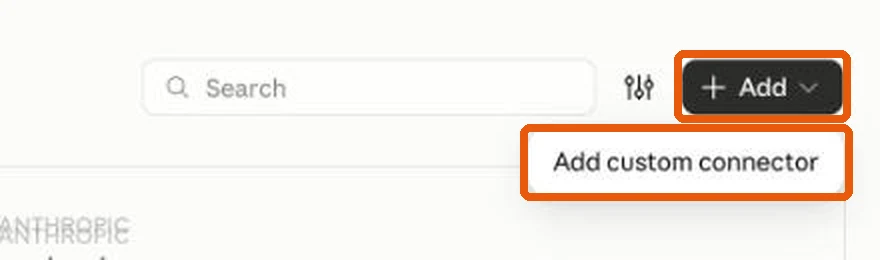
Click Add, then fill in two boxes
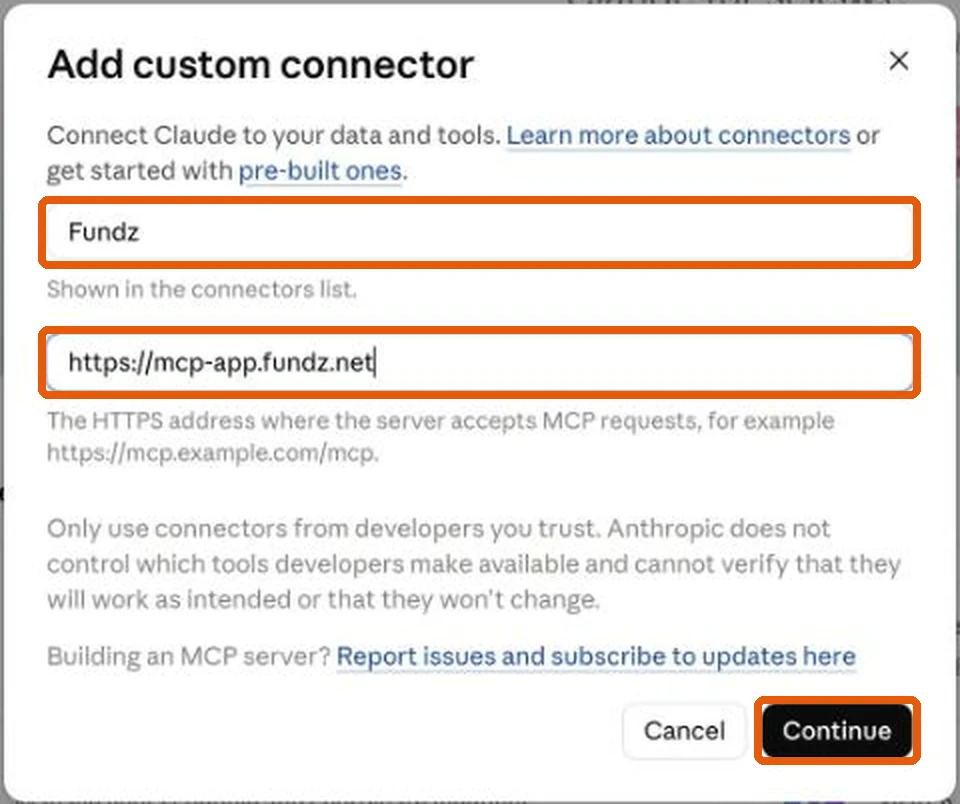
Click Add (top right), then Add custom connector. Type Fundz in Name and https://mcp-app.fundz.net in MCP server URL, exactly that, with nothing after .net. Click Continue.
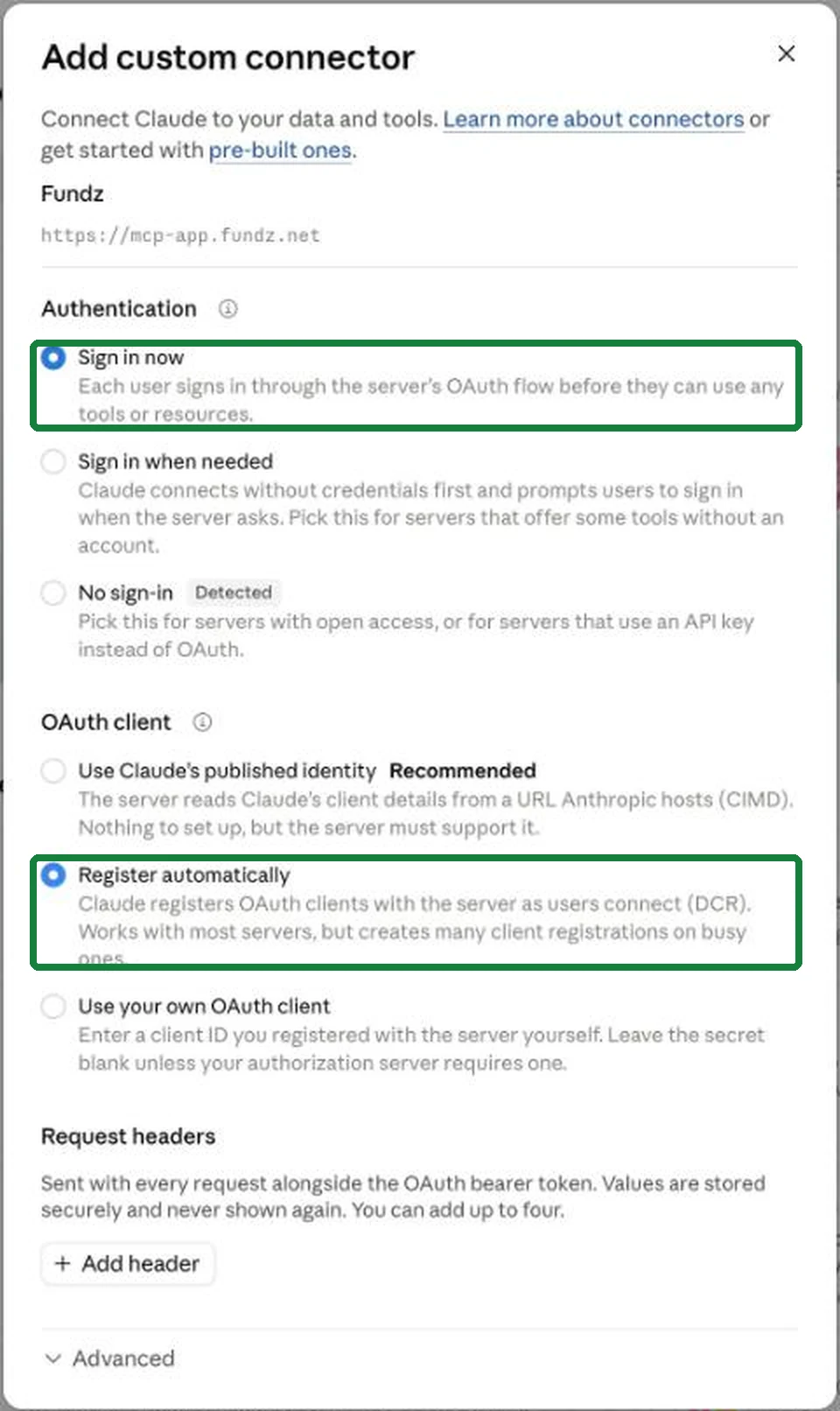
Change two settings
Claude pre-selects two options that do not work with Fundz. Change both:
Authentication: choose Sign in now (not “No sign-in”, even though Claude marks it “Detected”).
OAuth client: choose Register automatically (not “Use Claude’s published identity”, even though Claude marks it “Recommended”).
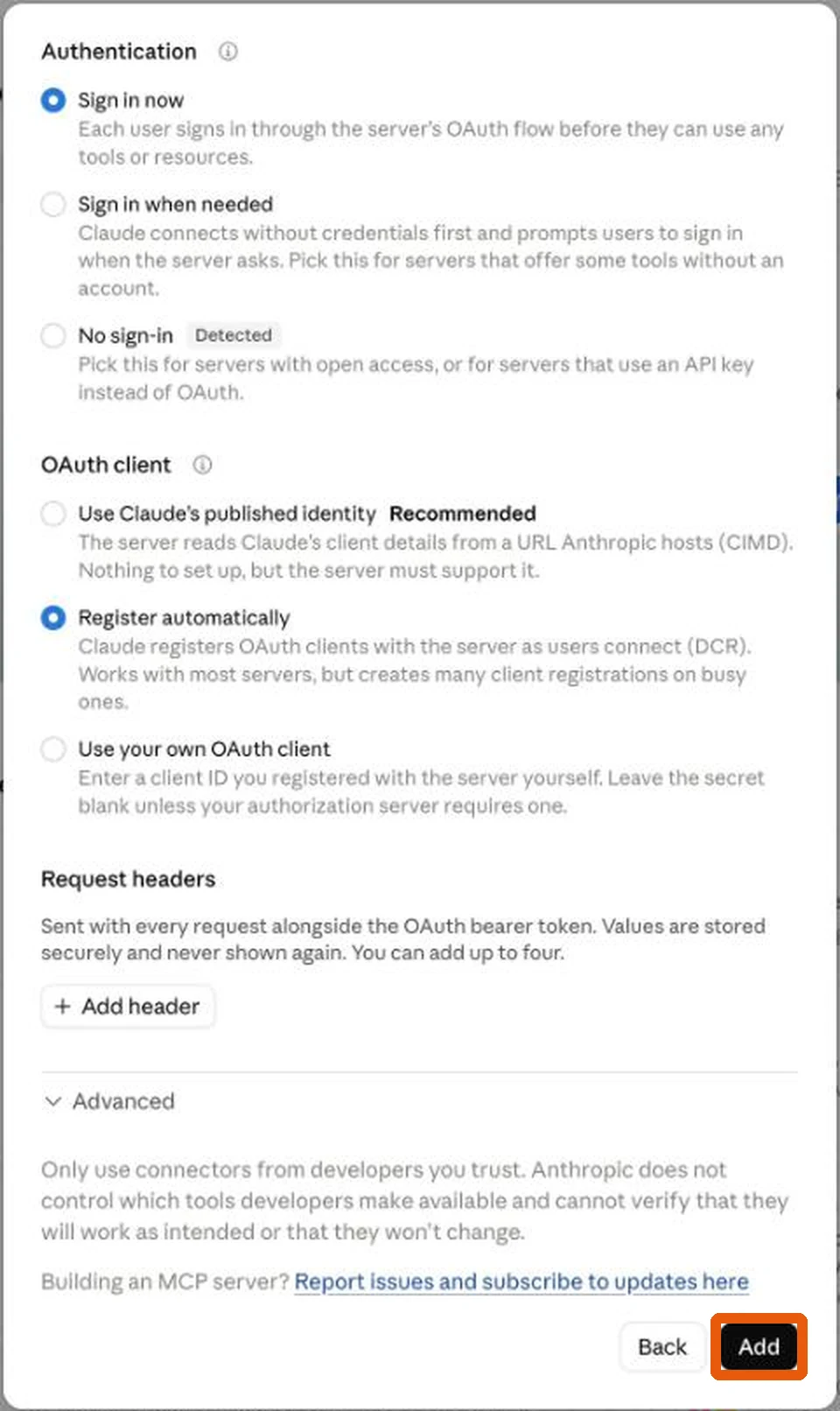
Scroll down and click Add
There is no Save button, and nothing saves on its own. The Add button is at the very bottom of the window, below “Request headers” and “Advanced”. Scroll down inside the window until you see it, then click it. If you close the window first, your choices are lost and you start again.
Click Connect
Fundz now appears in your connector list. Click Connect next to it and approve. The connector runs as you, with your own targeting, saved filters and plan. There is no key to copy and paste.
Ask it something
In any chat: “what are my daily leads today?”. It reads your real targeting, so the answer is yours, not a demo. The first time Claude uses each Fundz tool it asks your permission. Choose Always allow and it stops asking.
Your other tools are already in Claude. Fundz just joins them.
Fundz decides who to reach and why. It is not the sender. If your sequencer, CRM or inbox has a connector, Claude calls it in the same conversation. There is nothing to wire up between them.
Everything the connector can do
Twenty-five tools, covering seven signal types, investor intelligence, the contacts behind them, and your own targeting and saved searches. Reading contacts does not use a reveal; only revealing a new email spends your allowance, which is 600 on Strategic and 150 on Pro.
Run it on your own pipeline
If you already run your day in Claude, this is the shortest path from a company raising to you being in the conversation.